Making an Elementor Loop card fully clickable sounds simple until the layout collapses. People turn the whole container into a link, leave the title and button links inside, and the card breaks. Nested anchors are invalid HTML. Browsers invent their own repair. Your grid pays for it.
I use an overlay link pattern instead. One link covers the card. Child text is not a second . Buttons that must stay separate get a higher z-index. Pair this with the Loop Grid layout post if your grid is already broken.
Why container-as-anchor breaks Loop cards
In a Loop Item you often have:
- Image
- Title (linked)
- Excerpt
- Button (linked)
Then someone sets the outer container link to the post URL “so the whole card clicks.” Now you have inside . That is the break.
Symptoms:
- Layout shifts or collapses on the front
- Click targets feel random
- Only part of the card works
- Validator complaints / odd accessibility behavior
The editor may still look acceptable. The front DOM is where nested links misbehave.
Safer overlay link pattern
Goal: one clickable layer, no nested anchors.
Pattern:
- Loop Item root container: position relative. No link on this container.
- Inner content (image, title, text): no links on those widgets. Titles are plain text or headings without URL.
- Add a Button or a spacer element placed as an overlay, or an empty container, with the post permalink dynamic tag.
- Position that link layer absolute, inset 0, z-index above content but managed carefully if you need a separate CTA.
- Stretch the link so the whole card is hit-area.
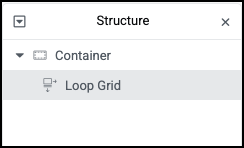
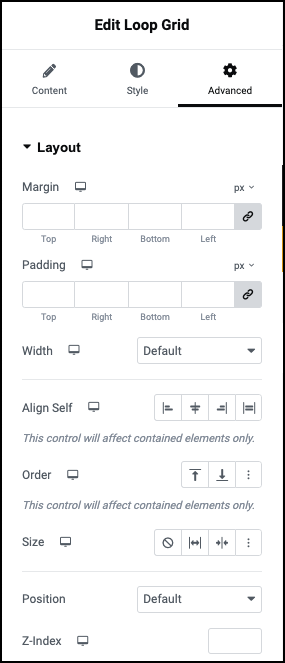
Practical Elementor approach many builders use:
- Root card container: Position Relative
- Add a Button at the end of the card
- Button text can be empty or a screen-reader friendly label
- Button positioning: Absolute, full size of card (set offsets to 0)
- Button link: dynamic Post URL
- Style the button background transparent, no shadow
- Remove links from title/image widgets
Now the card has one anchor. The layout stops fighting itself.
Elementor Pro clickable options
Some Elementor versions and container settings let you make a container clickable. That feature is fine only when no child links exist.
Rules:
- If the container is clickable, strip child Heading/Image/Button URLs
- If you need a second action (for example external “Buy” vs card “Read”), do not nest those links inside the clickable container. Move the secondary action outside the linked region, or use the overlay method with a higher z-index button for the secondary action only
I prefer the overlay button method on Loop cards because it stays obvious in the navigator and is easy to audit for nested links.
Child buttons and z-index
When the whole card is linked and you still want a visible CTA that is the same URL, style a fake button (a bordered container or text) under the overlay. The overlay handles the click. The “button” is visual only.
When you need a different URL on a child control:
- Overlay link z-index: 1
- Real child button z-index: 2
- Child button has its own link
- Confirm the child is not wrapped by another anchor in the DOM
Test clicks on empty card space and on the child button separately.
Nested link invalid HTML
If you already shipped nested links:
- Edit the Loop Item
- Remove URL from Heading, Image, and Container if an overlay will own the click
- Keep a single overlay link
- Regenerate Elementor CSS
- Purge cache
- Retest the Loop Grid front page
If the grid was collapsing, clearing nested links often fixes layout without a full redesign. See the Loop Grid breaking layout guide for overflow and min-width issues that remain after links are clean.
Test checklist
- View page source or inspect: only one
wrapping the card hit area - Click image area, title area, padding: all go to the post
- Mobile tap targets work
- Keyboard focus is visible on the overlay link
- No horizontal overflow on the card
- Screen reader label on empty overlay button is not blank (add accessible text or aria-label via available controls)
Soft close
Whole-card clicks are fine. Nested anchors are not. Use a relative card and one absolute overlay link, and keep child widgets unlink unless you intentionally raise a separate button above the overlay.
If your Loop cards still collapse after you remove nested links, send a link to the grid page. I work in Elementor Loop systems daily (about), and a quick DOM look usually shows whether you still have an anchor inside an anchor.
FAQs
Is a JavaScript card click better?
You can click-jack a card with JS. I prefer a real overlay link for accessibility and no-JS behavior. Use JS only if you have a constraint the overlay cannot meet.
Does this work in Loop Carousel too?
Yes. Same nested-link rule. Overlay pattern works in carousel items. Keep the item template clean.
Why did Elementor allow nested links?
The UI will let you set conflicting links. The browser is what fails. Audit the navigator like a code review.
Should titles stay linked for SEO?
One clear link to the post is enough. Overlay or title link, not both stacked. Duplicate nested links help neither SEO nor layout.