JetSmartFilters not working with a JetEngine Listing Grid usually looks like this: you click a filter, the URL or UI may react, and the listing stays the same. Or the listing goes empty. Or one filter works and the next does not.
I am going to show the fix order that actually clears this. Provider first. Then the three places the Query ID must match. Then Listing Grid CSS ID. Then taxonomy gotchas. Do not rebuild the whole directory until those line up.
Symptoms: filter clicks, listing ignores
Typical signs:
- Select or checkbox filter changes, Listing Grid does not.
- Listing clears to zero results even though posts exist.
- Two listings on one page both jump when one filter runs.
- Pagination and filters fight each other.
If the filter widget itself fails to render options, that is a data source problem. If options render but the grid ignores clicks, start with provider and Query ID.
This filter for = JetEngine
On the JetSmartFilters widget (or the filter you placed):
- Open the filter settings.
- Set This filter for to JetEngine when the target is a JetEngine Listing Grid.
- Set Apply type to AJAX or Mixed (AJAX is the usual choice for in-place listing updates).
- Set Apply on to Value change (or your intended trigger).
If This filter for still points at a default WordPress posts widget, WooCommerce, or another provider, the Listing Grid will ignore the filter. That mismatch alone explains a lot of “filters do nothing” tickets.
Make sure JetSmartFilters indexing / providers are enabled for JetEngine in the JetSmartFilters settings screens when your setup requires it.
Custom Query ID vs Query ID
Here is the trap Crocoblock documents, and builders still miss.
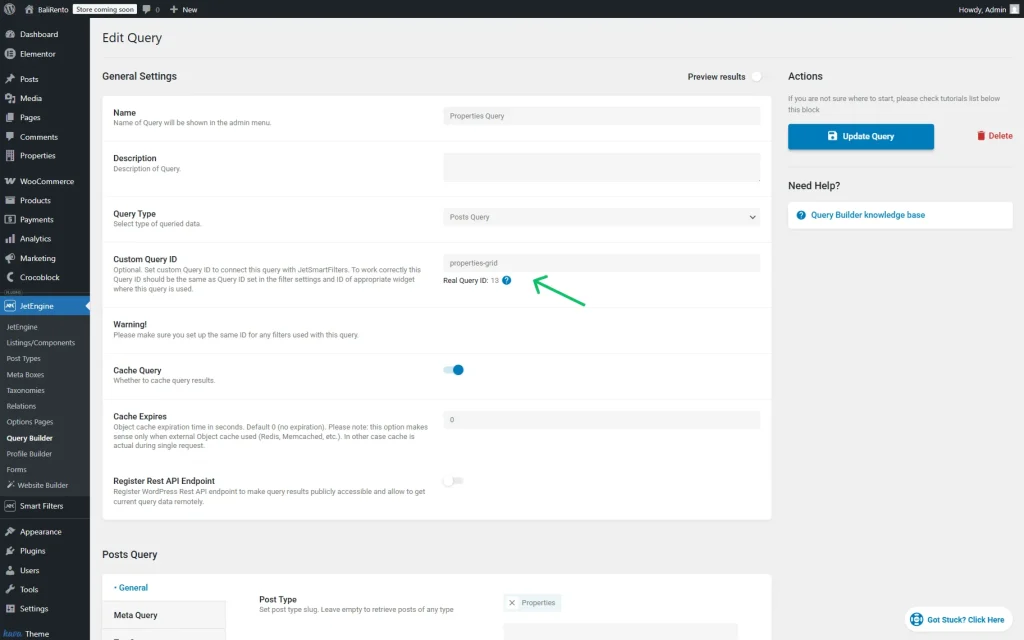
When you use JetEngine Query Builder, you often set a Custom Query ID string on the query (for example filter_for_posts). That string is not decoration. Filters and the Listing Grid need the same ID.
Difference that matters:
- Query ID in JetSmartFilters should match the Custom Query ID from Query Builder when you are filtering that custom query.
- Do not invent a second string on the filter and hope JetEngine guesses.
If Query Builder returns empty after filtering, wrong Custom Query ID wiring is a prime suspect.
Three places that must match
Write one ID string. Use it in three places.
- Query Builder: Custom Query ID field (example:
listings_filter) - JetSmartFilters widget: Query ID field =
listings_filter - Listing Grid: Advanced → CSS ID =
listings_filter
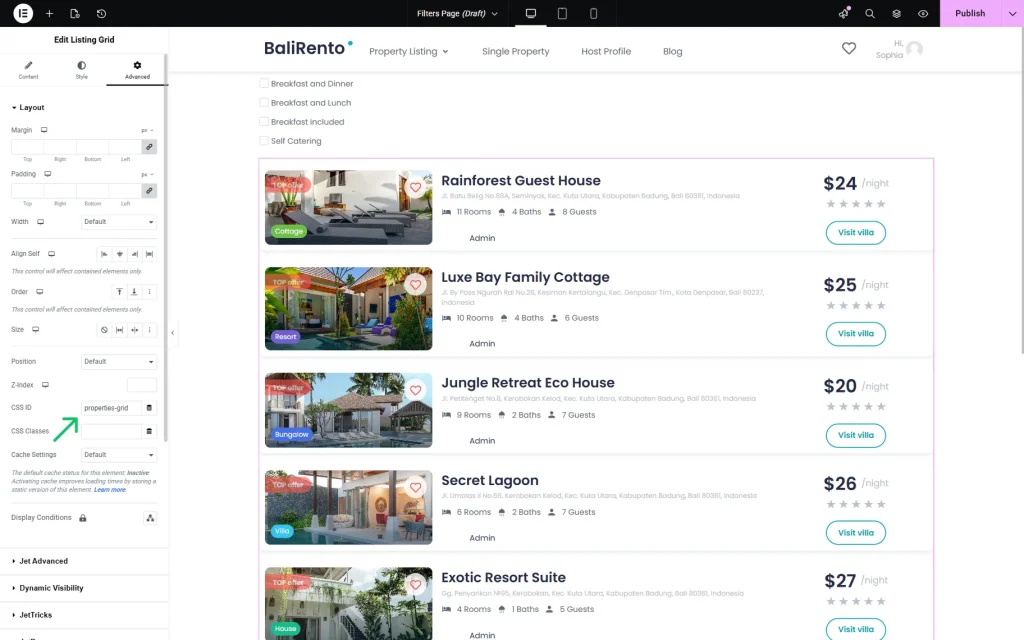
All three. Same spelling. Same underscores. No extra spaces.
If any one differs, AJAX filtering will miss the listing or hit the wrong widget. When two Listing Grids share a page, unique IDs keep filters from updating both by accident.
I treat this as a checklist, not a maybe. If filters fail, I verify these three before I touch taxonomy settings again.
Listing Grid CSS ID
People set the filter Query ID correctly and forget the Listing Grid CSS ID. The filter then has nowhere precise to send the updated query.
Steps:
- Edit the page with the Listing Grid.
- Select the Listing Grid widget.
- Advanced tab → CSS ID
- Paste the same Custom Query ID string
- Update the page and retest on the front
Also confirm the Listing Grid is actually using that Query Builder query (Custom Query enabled and the correct query selected). A grid still on a default posts query will not follow a Query Builder Custom Query ID.
Taxonomy filter gotchas
Taxonomy filters fail for boring reasons:
- Wrong taxonomy selected in the filter (Categories vs a CPT taxonomy).
- Listing query post type does not include posts that have those terms.
- Two listings, one filter, one shared ID so results look “random.”
- Terms exist in admin but the query excludes them (status, offset, posts per page, meta query).
For CPT directories, confirm the filter taxonomy is the CPT taxonomy, and the Query Builder post type matches. Mixing blog Categories with a Properties CPT is a classic empty-result path.
If you need separate filters for posts and a CPT on one page, give each pair its own Custom Query ID and its own Listing Grid CSS ID. Do not reuse filter_for_posts for both.
Soft close
When JetSmartFilters does not update a JetEngine Listing Grid, start with provider = JetEngine, then force the same ID through Query Builder, the filter, and the Listing Grid CSS ID. Most “broken filters” are ID mismatches, not dead plugins.
If the three IDs match and the listing still ignores the filter, contact me with the page URL and the Query ID string you used. I build JetEngine directories and filter systems for a living (about), and I would rather see the real query setup than guess.
FAQs
Do I need a Custom Query ID for every Listing Grid?
If JetSmartFilters must target that grid (especially with Query Builder), yes, use a clear Custom Query ID and mirror it on the filter and the grid CSS ID. Plain unfiltered listings can skip it.
AJAX vs Mixed vs Page reload?
AJAX updates the listing in place. Page reload applies filters through a full refresh. Mixed can combine behaviors. For most directory UIs, AJAX is what people expect. If AJAX fails only when a cache plugin is aggressive, exclude the page from full-page cache and retest.
Why does Crocoblock talk about empty Query Builder results?
Wrong parameters and wrong Custom Query ID wiring both produce empty lists. Fix IDs first, then reopen the query’s post type, status, and taxonomy clauses.
Can one filter control two Listing Grids?
Only if you intend that and both grids share the targeting setup carefully. For two independent lists, use two IDs. Shared IDs are how “both grids jumped” bugs start.